

Strong database knowledge is an important part of technical interviews because many companies look for candidates who understand how data is stored, managed, and organized. A solid understanding of DBMS creates a strong base for many technical and software-related roles.
Preparing for technical interviews can feel difficult at first, especially when you are unsure which topics to focus on. With the right preparation, the process becomes much easier.
Practicing DBMS interview questions helps you understand commonly asked topics and improve your knowledge of important concepts. It also builds confidence for interviews.
This blog covers questions from beginner to advanced levels, making it easier to strengthen your concepts, improve preparation, and get ready for interviews with confidence. To gain practical skills in databases, frontend, and backend technologies, you can also join the Full Stack Development Course by WsCube Tech.
The Growing Demand for DBMS
Data is one of the most valuable assets for modern businesses, and managing it efficiently has become essential. This is where Database Management Systems (DBMS) play an important role.
The demand for DBMS has continued to rise over the years as businesses increasingly rely on data-driven systems. DBMS helps organizations manage large volumes of data, improve accessibility, maintain security, and support smooth business operations.
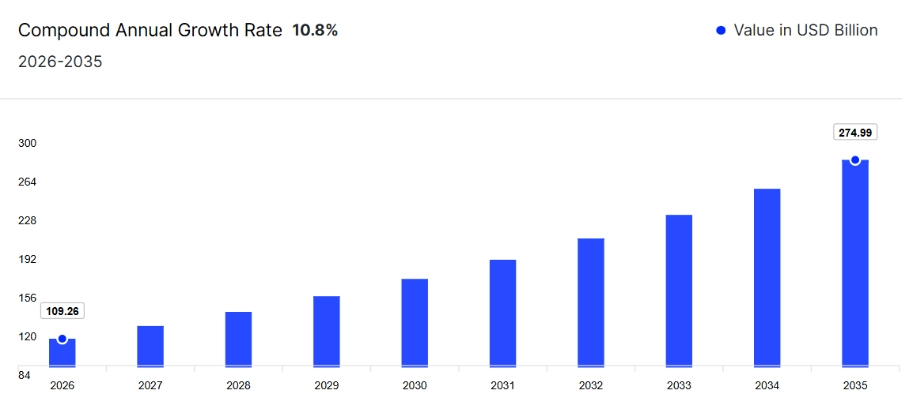
In fact, the global DBMS market size reached USD 65.3 billion in 2022. From 2023 to 2028, the market is expected to grow at a compound annual growth rate (CAGR) of 10.8%, showing the increasing demand for database technologies.
With this growing demand for DBMS, the need for skilled professionals is also increasing rapidly. DBMS skills are highly valued across industries such as information technology, finance, healthcare, and retail.
Some of the most in-demand DBMS technologies include:
Knowledge of cloud-based database platforms such as Amazon Web Services (AWS) and Microsoft Azure is also becoming increasingly important as more businesses continue moving to cloud environments.
If you want to build a strong career in the tech industry, developing DBMS and database-related skills can help you stand out and improve your career opportunities.
That is why this blog covers top DBMS interview questions and answers, from basic concepts to advanced topics. Whether you are a beginner or an experienced learner, this guide will help strengthen your database knowledge and prepare you for interviews.
DBMS Interview Questions for Freshers
Here are some of the most commonly asked basic DBMS interview questions and answers for freshers that are frequently discussed during the recruitment process:
1. What is a database?
A database is an organized collection of data stored electronically in a structured manner. It helps users efficiently store, manage, retrieve, and update information, making data handling easier and supporting applications such as banking, websites, and business systems.
2. What is DBMS? Explain in simple terms.
DBMS stands for Database Management System. It is a software system used to store, organize, manage, and retrieve data in a database. A database contains information stored electronically, and DBMS acts as a bridge that helps users interact with that data in an organized and efficient way.
Let’s Understand DBMS Definition With Real-life Example
Imagine you run a small retail store that sells various products, such as clothing, accessories, and home goods. You want to keep track of your inventory, customer information, sales data, and employee records.
Instead of using a bunch of different spreadsheets or paper records to manage all of this information, you could use a database management system to store and organize everything in one place.
With a DBMS, you could create a database that includes tables for each type of information you need to track. This can include a table for inventory, a table for customer information, a table for sales data, a table for employee records, and so on.
You can easily add new data to each table, update existing data, or delete data as needed. You could also run queries to search for specific information or generate reports to analyze data trends.
Overall, a DBMS would make it much easier for you to manage and use all of the data you need to run your retail store effectively.
3. Where can DBMS be used?
DBMS (Database Management System) can be used in a variety of applications and industries where data storage, organization, retrieval, and manipulation are required. Here are some common examples of where DBMS can be used:
a) Business:
It is widely used by businesses to store and manage customer data, sales data, inventory data, financial data, employee data, and much more.
b) Healthcare:
DBMS is used to manage patient data, including medical history, prescriptions, test results, and other information.
c) Education:
Schools, colleges, and other educational organizations can implement DBMS to store student information, such as attendance records, grades, and academic performance.
d) Government:
Governments use DBMS to store and manage data related to taxes, licenses, permits, and other official records.
e) E-commerce:
Online retailers use DBMS to store and manage product catalogs, customer orders, and payment information.
f) Social Media Platforms:
Social media platforms use DBMS to store and manage user data, including profiles, posts, comments, and messages.
g) Telecommunication Industry:
Telecommunications companies use DBMS to store and manage customer account information, call records, and network usage data.
4. When was DBMS first introduced?
The first DBMS was introduced in the early 1960s, with IBM’s Integrated Data Store (IDS) being one of the earliest examples.
However, the relational database model, which forms the basis of most modern DBMSs, was first introduced in the 1970s by Edgar F. Codd, a researcher at IBM.
Codd’s paper “A Relational Model of Data for Large Shared Data Banks” described a new approach to data management that emphasized the use of tables and relationships between them, rather than hierarchical or network-based data models.
The first commercial relational DBMS was released by IBM in 1981, called SQL/DS. This was followed by other popular relational DBMSs, including Oracle, Microsoft SQL Server, and MySQL.
5. What are the benefits of DBMS?
There are several advantages of using a DBMS (Database Management System) in organizations and applications. Some of the major benefits are listed below:
1. Efficient data management:
DBMS helps manage data efficiently by organizing it in a structured manner, making it easier to store, search, retrieve, and update information.
2. Data consistency and integrity:
Database management system ensures data consistency and integrity by enforcing data constraints and rules, such as uniqueness and referential integrity, to prevent errors and inconsistencies in the data.
3. Improved data security:
It provides better data security by allowing access to data only to authorized users and by implementing various security mechanisms like encryption, access control, and auditing.
4. Improved data accessibility:
It provides easy access to data by allowing multiple users to access and manipulate data simultaneously. This can be achieved without compromising the data’s integrity or consistency.
5. Increased productivity:
A Database Management System increases productivity by reducing manual work, providing faster data access, and minimizing errors.
6. Better decision-making:
Moreover, it facilitates better decision-making by providing access to accurate, up-to-date, and comprehensive data. This helps in making informed decisions based on data analysis.
7. Scalability:
DBMS can handle large amounts of data and can scale up or down depending on an organization’s needs, making it easy to manage growing amounts of data.
6. What is the difference between a database and DBMS?
A database and a DBMS (Database Management System) are two related but distinct concepts in the field of data management.
It is one of the top DBMS interview questions for placement, especially if you are a fresher.
Here are the differences between both, presented in tabular form:
| Database | DBMS |
| A collection of related data | A software system that manages the storage, organization, and retrieval of data |
| Can be a simple text file or a complex system of interconnected tables | A software system with many features and capabilities |
| Can be managed manually or with the help of a DBMS | Requires a DBMS to function effectively |
| Can be small or large | Can handle small to very large databases |
| Primarily focuses on storing and retrieving data | Provides a wide range of features, including data security, backup and recovery, concurrency control, and more |
| Data can be accessed and modified directly | Data access and modification are controlled by the DBMS, using SQL (Structured Query Language) or other programming languages |
| Performance and scalability are limited by the hardware and software used to manage the database | Performance and scalability can be optimized using various techniques and features provided by the DBMS |
Suggested Reading: NodeJS Interview Questions and Answers
7. What is a relation in DBMS?
In DBMS, a relation refers to a table that stores data in rows and columns. Each row represents a record (tuple), and each column represents an attribute, helping organize and manage related information in a structured format.
8. Are NULL values in a database the same as that of blank space or zero?
No, NULL values in a database are not the same as a blank space or zero. A NULL value represents the absence of a value or unknown information. It indicates that data is missing, undefined, or not yet available.
On the other hand, a blank space is an actual character value, and zero (0) is a numeric value. Both contain specific data, while NULL simply means no value exists in that field.
9. What are rows and columns in a DBMS?
- Rows: Rows represent individual records or entries in a table. Each row contains complete information about a single item.
- Columns: Columns represent attributes or fields of a table. Each column stores a specific type of information, such as name, age, or ID.
10. What are the 3 main types of databases?
There are several types of databases, but the three main types of databases are:
i) Relational databases
- Relational databases are the most common type of databases. They store data in tables, where each table represents a specific entity or object, and each row represents a record or instance of that entity.
- Relational databases use SQL (Structured Query Language) to manage and manipulate data.
ii) NoSQL databases
- NoSQL databases are non-relational databases that store data in a variety of ways, such as key-value pairs, documents, or graphs.
- They are designed to handle large volumes of unstructured or semi-structured data and can scale horizontally to handle increasing amounts of data.
iii) Object-oriented databases
- Object-oriented databases store data as objects, which are instances of classes that contain both data and behavior.
- Object-oriented databases are well-suited for complex data structures and applications that require extensive data manipulation.
Each type of database has its own strengths and weaknesses and is suitable for different types of applications. Choosing the right type of database depends on factors such as the size and complexity of the data, the performance requirements of the application, and the scalability needs of the system.
11. What are the 3 main functions of a DBMS?
The three main functions of a DBMS (Database Management System) are:
i) Data Storage
One of the primary functions of a DBMS is to store large amounts of data in an organized and structured way. It defines the structure of data using tables, fields, and relationships, while also managing how data is stored on physical devices.
ii) Data Retrieval and Manipulation
A DBMS allows users to retrieve, insert, update, and delete data efficiently. It uses languages such as SQL (Structured Query Language) to search, filter, sort, and manage information according to user needs.
iii) Data Security and Integrity
A DBMS helps protect data by controlling user access through permissions and roles. It also maintains data accuracy and consistency using features such as validation rules and transaction management.
These functions help organizations manage large volumes of data efficiently while ensuring that the information remains secure, accurate, and easily accessible.